Two healthcare clients, two very different briefs. Hologic needed a field-services portal for engineers who fix lab equipment. Quidel needed a complete redesign of the territory tool their sales team had given up on. Both came down to research, judgment, and care for the user.
Real healthcare clients. Worked with Hologic and Quidel — global names in diagnostics — alongside other healthcare projects. Each project came with NDAs, regulated environments, and demanding stakeholders.
Expert users, not consumers. Field service engineers, lab technicians, clinicians. People with no time for friction, no patience for ambiguity, and zero tolerance for visual noise.
Data-heavy interfaces. Hundreds of devices, real-time status, geographic distribution, priority hierarchies. The job was turning enterprise data into actionable, scannable, non-negotiable visual systems.
Research, not just design. Every project started with user interviews — field engineers, technicians, operators. Personas, journey maps, and usability testing weren't optional. The screens are the easy part.
A monitoring and work-order platform for Hologic's field service engineers — built to consolidate disparate tools and let engineers proactively address device issues across hundreds of healthcare sites.
Audited the existing tool landscape — disparate systems, manual workflows, no single source of truth for FSEs in the field.
Wrote an interview script focused on values and motivations. Conducted multiple remote interviews over 5 days with the target audience.
Synthesized insights into personas, then designed the Portal, FSE Dashboard, and Admin Panel — collaborating with developers throughout for feasibility.
Iterated on designs based on engineering feedback and continued user input. Research insights served as a reference point throughout.
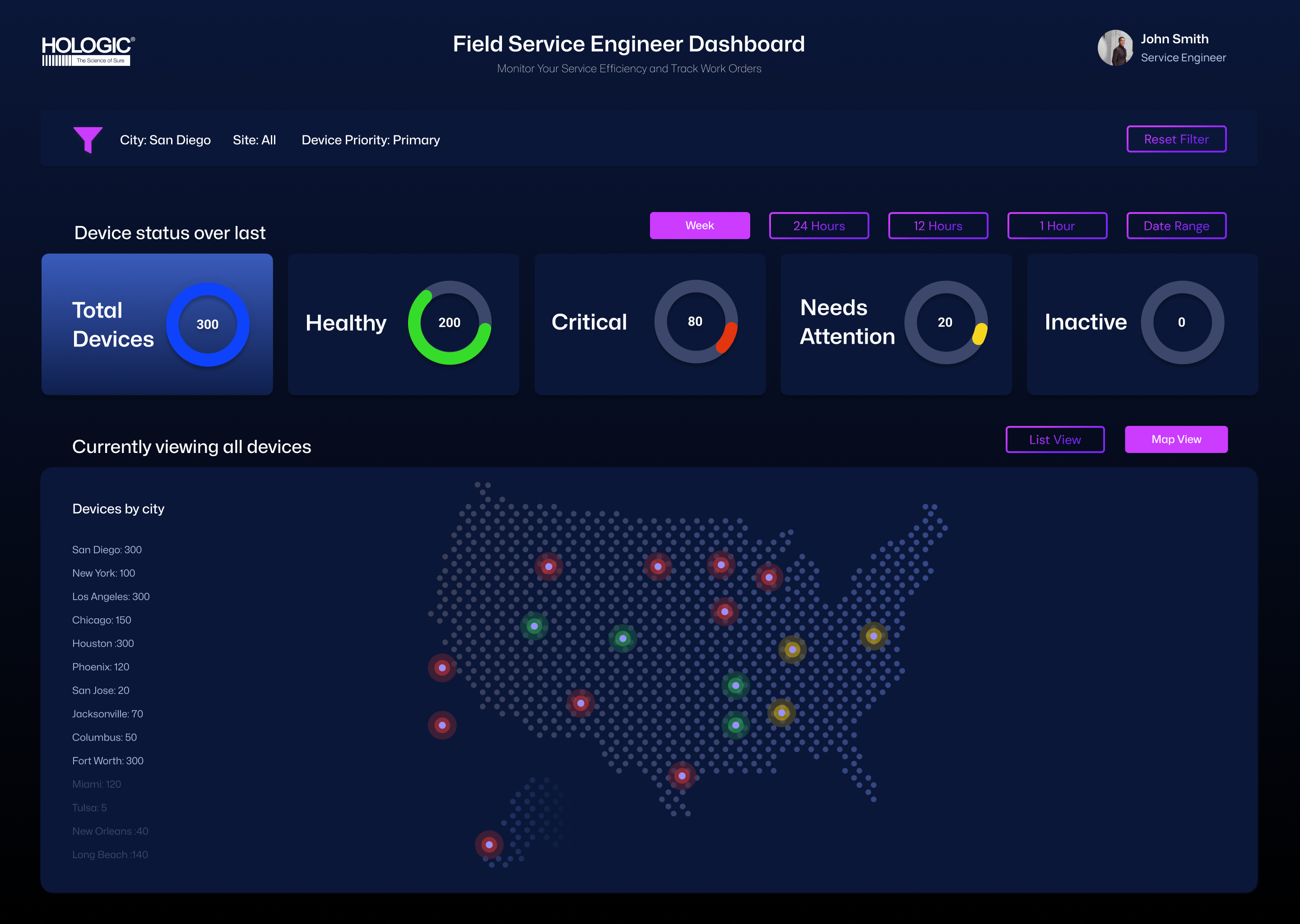
The Map View answers a question every FSE asks first: where are my devices, and which ones need attention right now? Color-coded status indicators (red for critical, yellow for warning, green for healthy) plot device locations across the US, with a city-level breakdown on the left for quick triage planning.
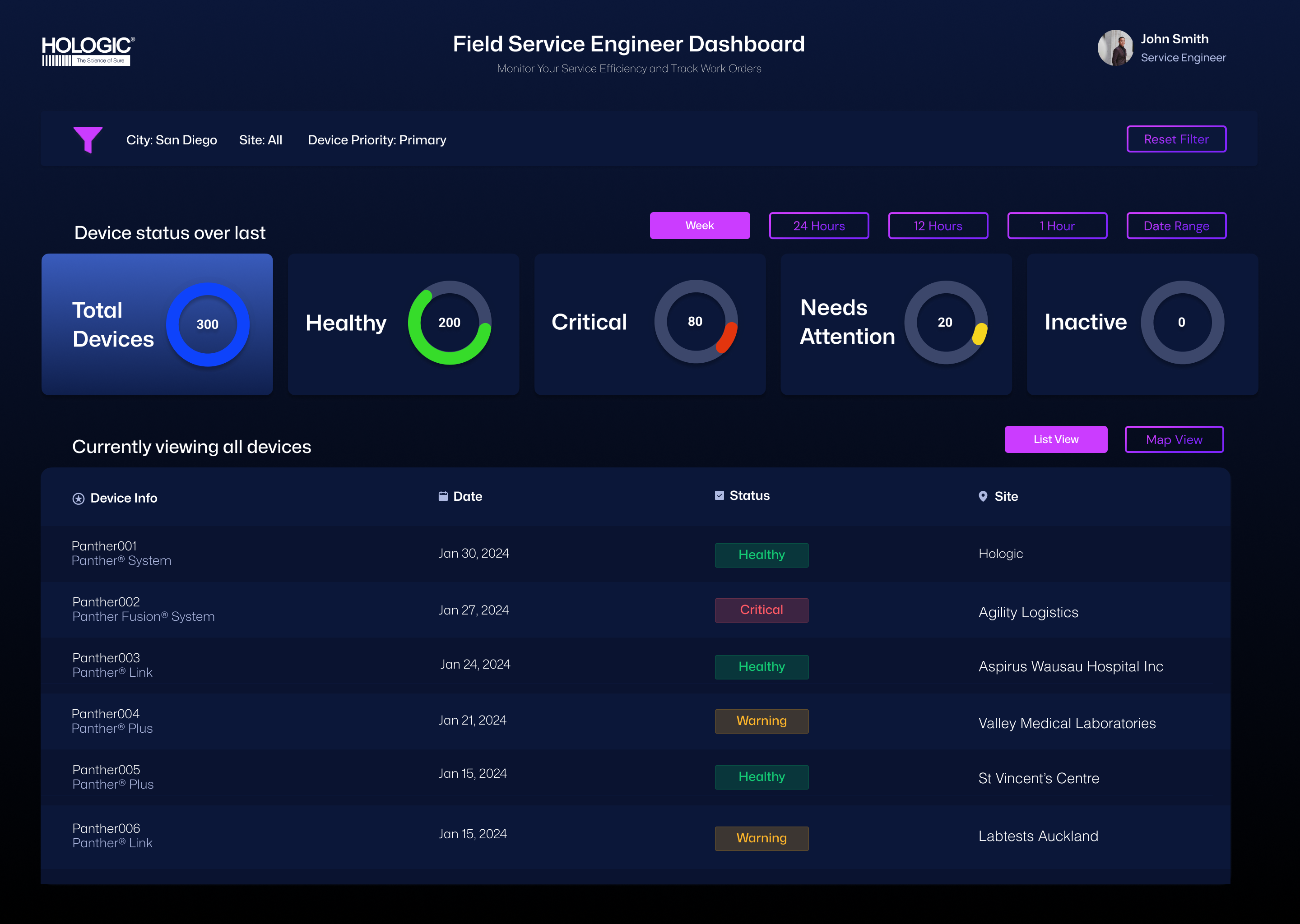
The same data, viewed differently. Status-over-time charts at the top — Total, Healthy, Critical, Needs Attention, Inactive — give engineers a system-level pulse before they drill down. Time-window filters (Week / 24h / 12h / 1h) let them shift between long-range planning and right-now triage. Device records are blurred to protect client privacy — the layout and design system are the work; the data belongs to Hologic.
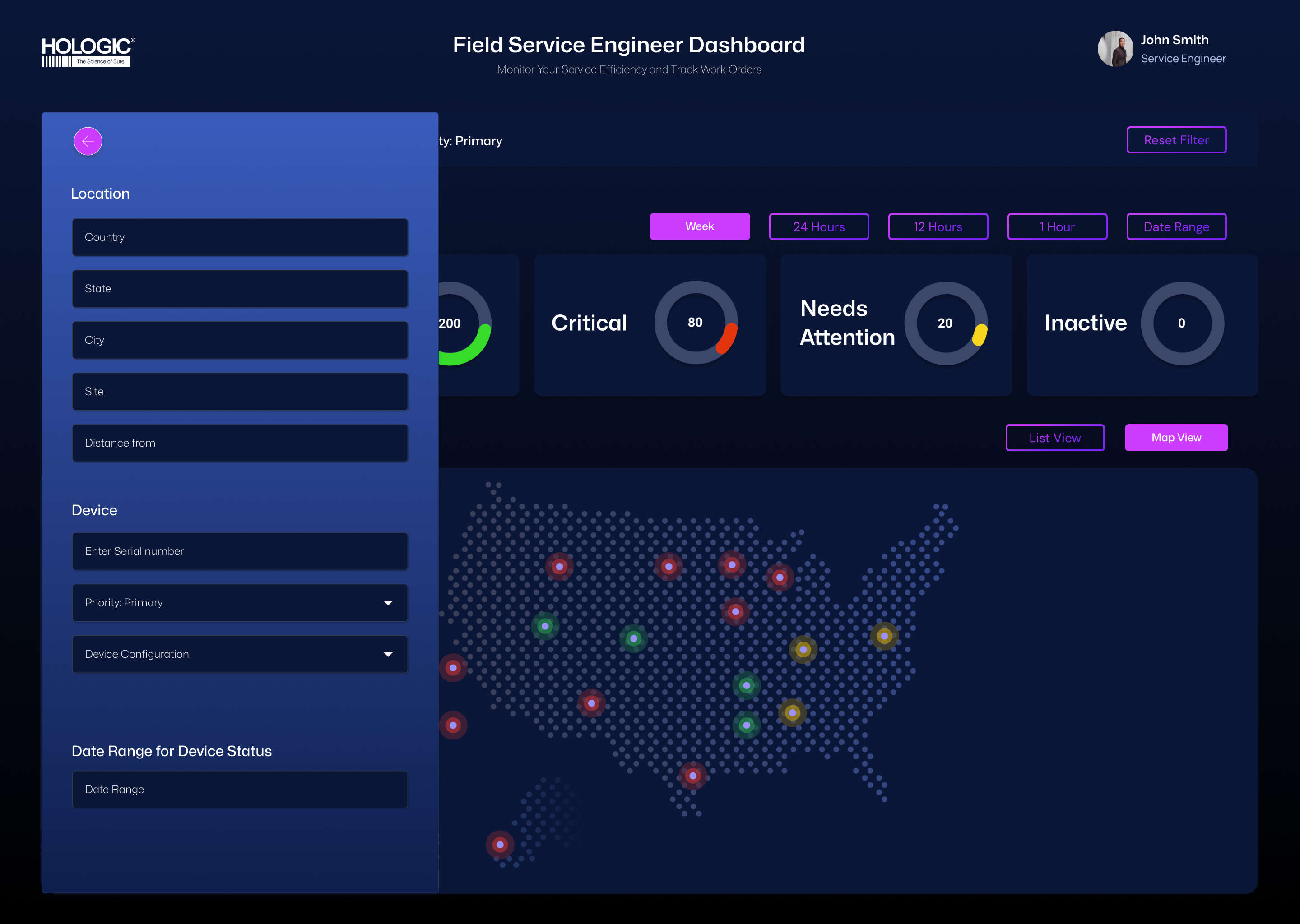
With hundreds of devices in play, filtering isn't a feature — it's the product. The slide-out filter panel groups controls into Location, Device, and Date Range, with sensible defaults (Priority: Primary) so engineers can get to a clean view in two clicks. The whole panel was designed to be keyboard-navigable for field engineers working hands-busy.
Map and list views share the same status logic and color system, so engineers can switch perspectives without recalibrating.
Red is reserved for critical only. Yellow for warning. Green for healthy. No decoration. In healthcare, color is a signaling system, not a styling choice.
Donut charts at the top of every view answer "what's the situation?" before a single record is loaded — saving FSEs scanning time on every visit.
A complete redesign of myVirena, Quidel's territory-management platform for sales teams in the field. The brief was simple, the work was not: take a tool TAMs barely tolerated and build the one they actually want to open.
Quidel's TAMs are responsible for entire US territories — driving, calling, visiting customers, chasing distributors, and hitting quarterly targets. They had myVirena, the official platform. But in interviews, the picture was clear: they barely opened it.
They were stitching their day together with five other tools — Tableau for charts, Cognos for raw revenue, QForce for contracts and call logs, BadgerMap for visit planning, Highspot for sales materials. myVirena should have been the home base. Instead, it was the tool they avoided.
I started with interviews — open-ended conversations with TAMs about how they actually spent their day. Not what the org chart said they should do. What they actually did between 8 AM and 6 PM, in the office and on the road.
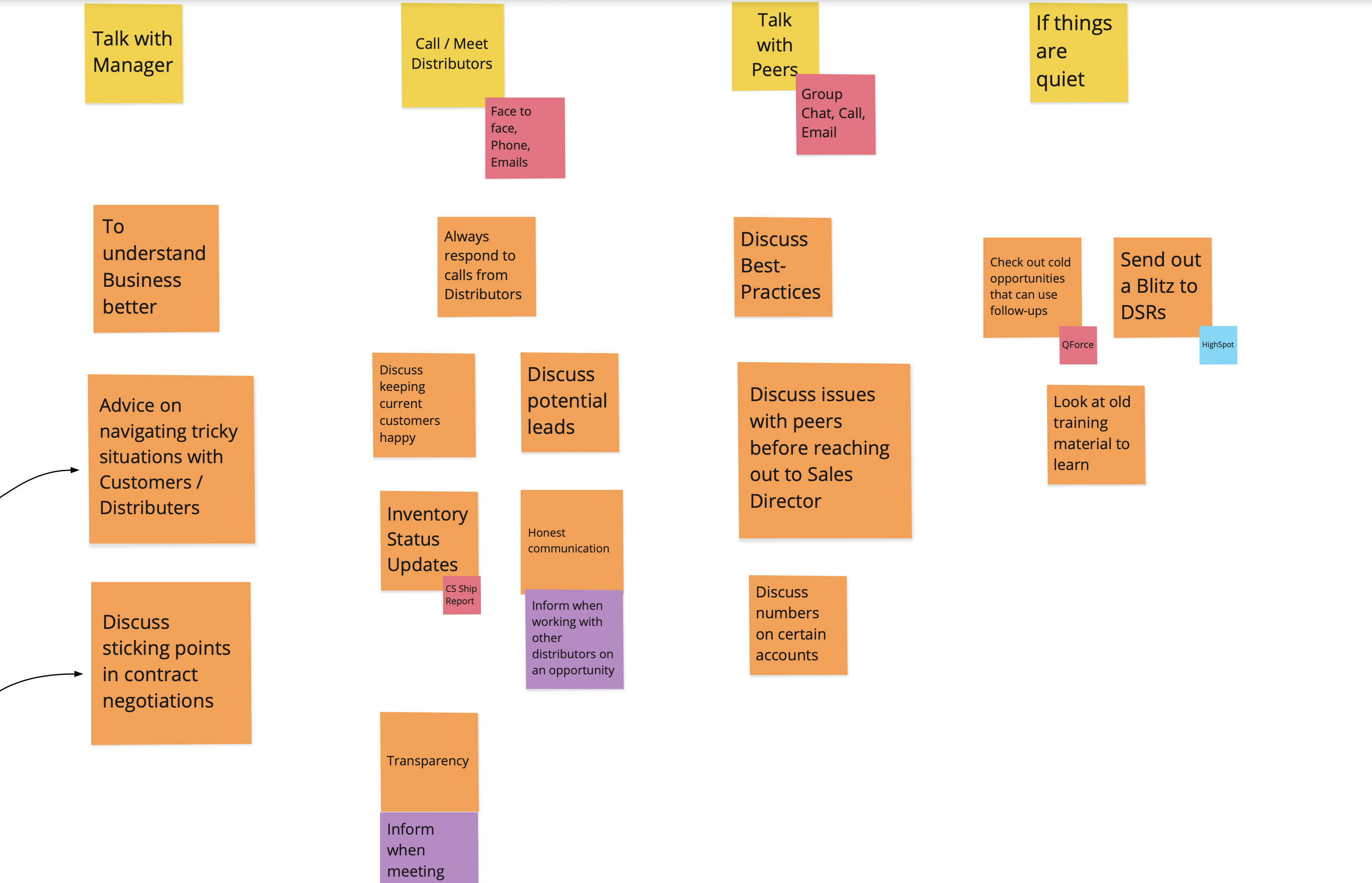
Then I clustered the raw data. Sticky note by sticky note, behavior by behavior, until patterns emerged: "Talk with Manager," "Call Distributors," "Talk with Peers," "If things are quiet." Each cluster came with the tools TAMs reached for in that moment — Tableau, QForce, Highspot, BadgerMap.
This is the part of the work AI can't do. The clusters didn't exist before the interviews. They emerged from listening — and from being willing to throw out my first three groupings before the right ones surfaced.
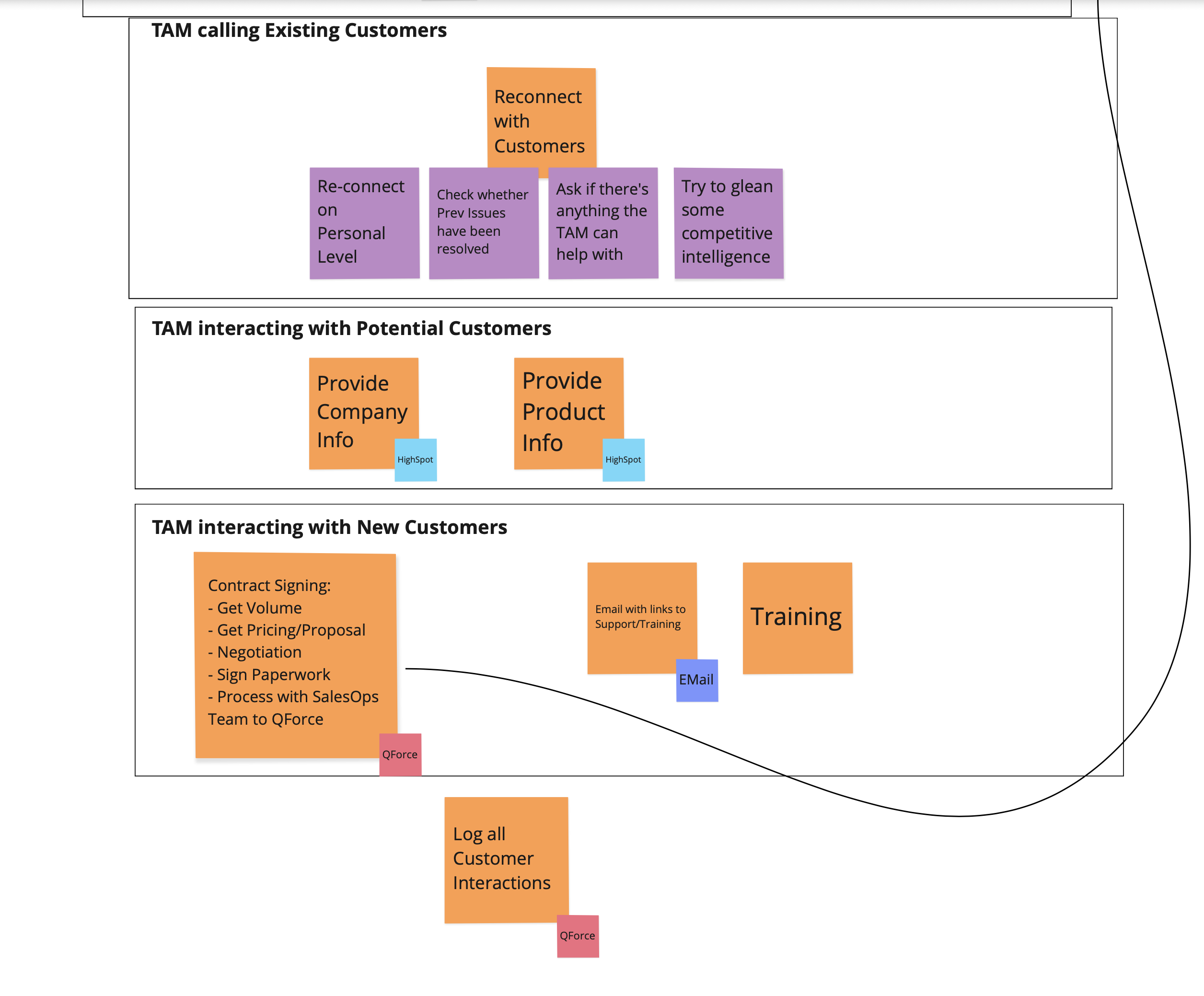
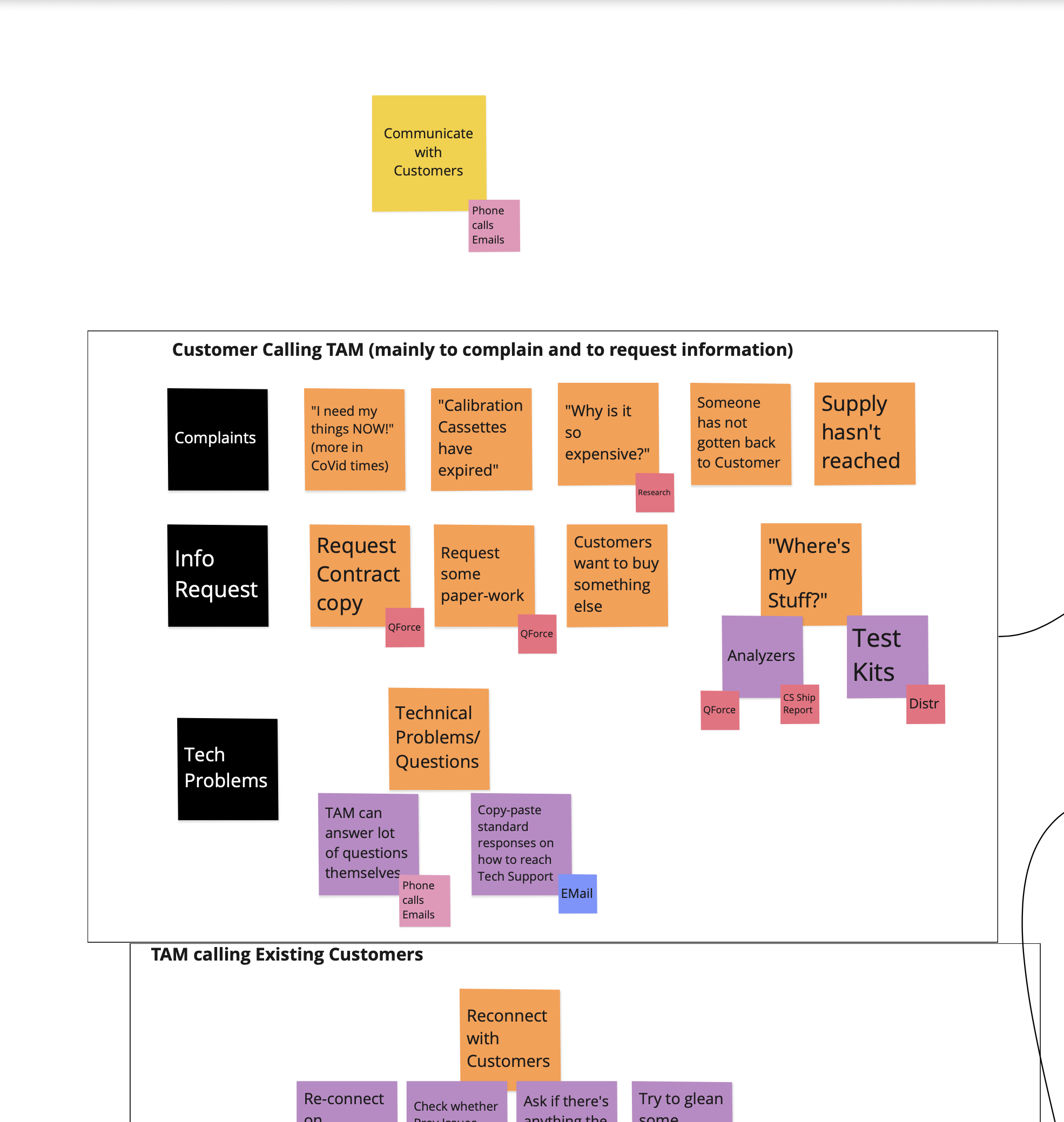
I synthesized the clusters into a journey map: a TAM's day in the office, broken down by the kinds of conversations and actions they handle. Customer calling TAM (complaints, info requests, tech problems). TAM calling existing customers (reconnect, check on issues, glean intel). TAM with potential customers. TAM with new customers (contracts, training, onboarding).
Each branch came with the tools they used and — more importantly — the moments where the tools failed them. Where they had to alt-tab to Tableau because myVirena couldn't show the chart. Where they had to copy-paste from Cognos because the data was stale. Where they had to call a distributor because the system didn't have inventory status.
The journey map became the design brief. Every place where a TAM had to leave myVirena was a feature gap. Every moment of friction was a redesign target.
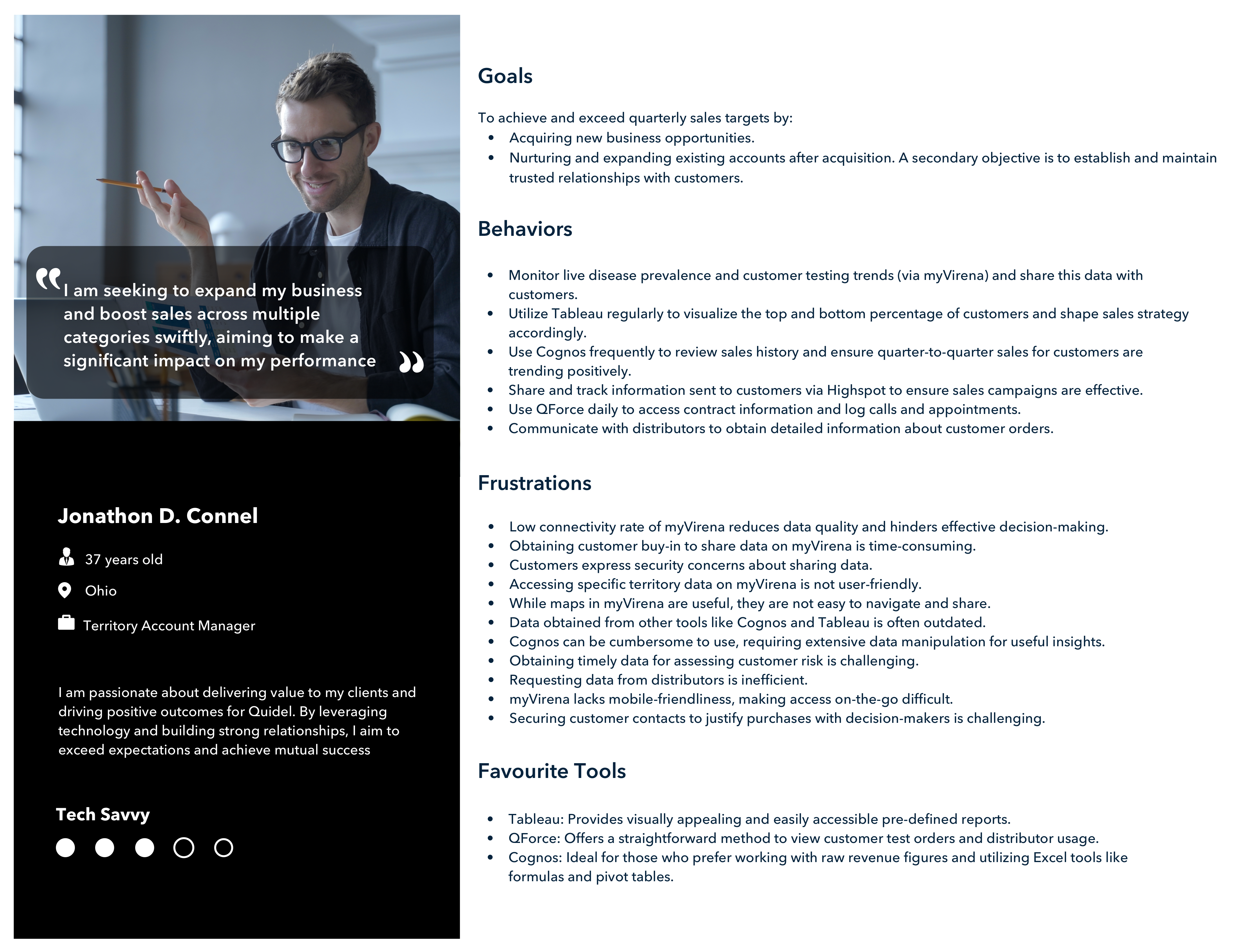
Synthesized from the interviews — a composite TAM. Specific frustrations from real conversations. Specific tools from real workflows. Specific goals tied to actual quarterly targets. This persona drove every screen-level design decision that followed.
The biggest finding from research wasn't subtle: TAMs live on the road. They check data between meetings, in parking lots, in airports. The legacy myVirena was desktop-only. That single architectural decision was the reason they reached for other tools.
The redesign started from a phone screen. Every flow had to work in one hand, in landscape transit, with thumb-only input. If a screen needed two hands or a desktop, it was wrong.
Login set the tone — minimal, clean, fast. No corporate noise. The tool earns its place by being instantly useful, not by demanding ceremony.
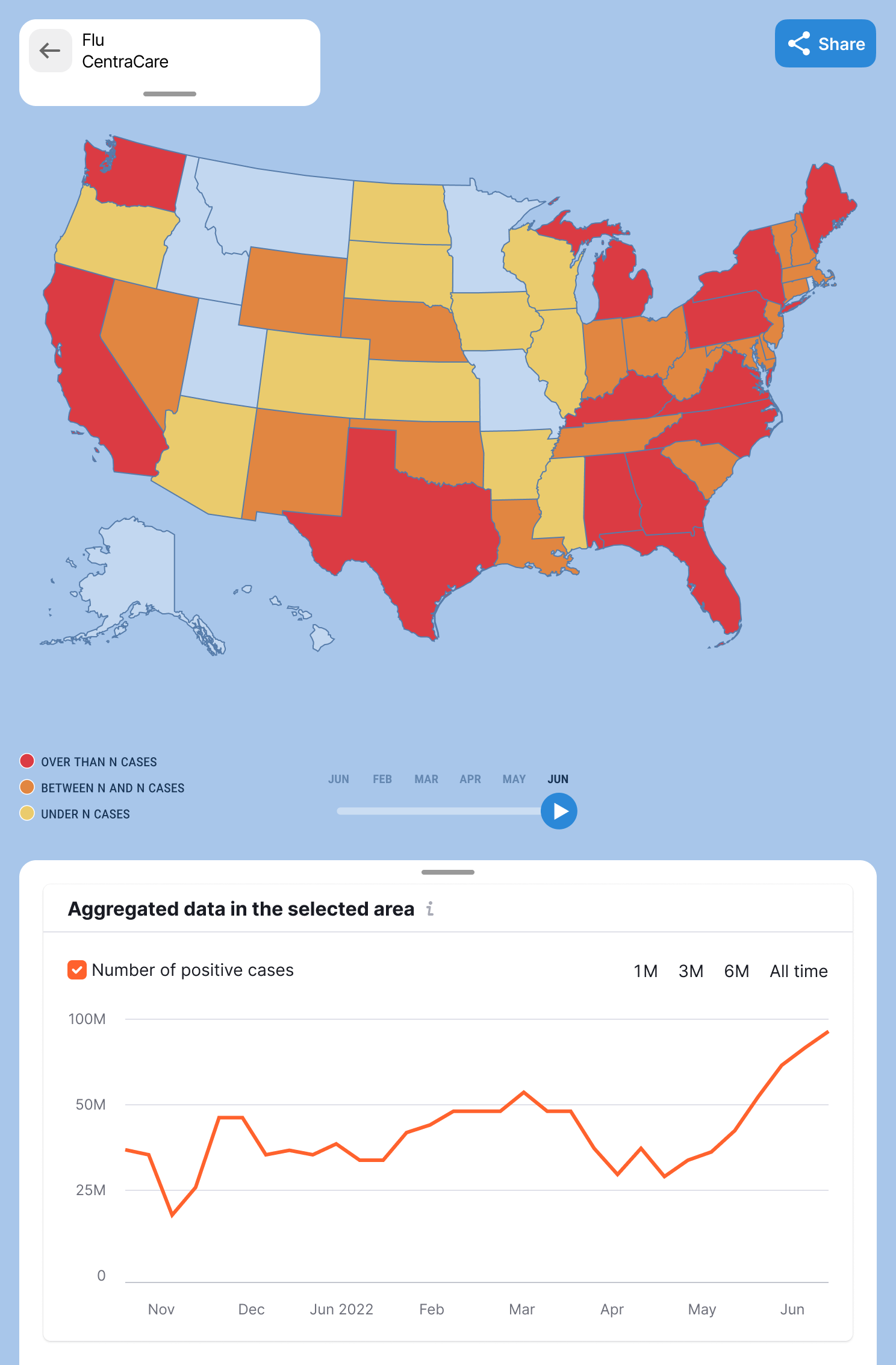
TAMs think in geography. "How's Florida doing this quarter?" "Where are my biggest accounts in the southeast?" "Which clients haven't I visited in 60 days?" These questions are spatial first, data second.
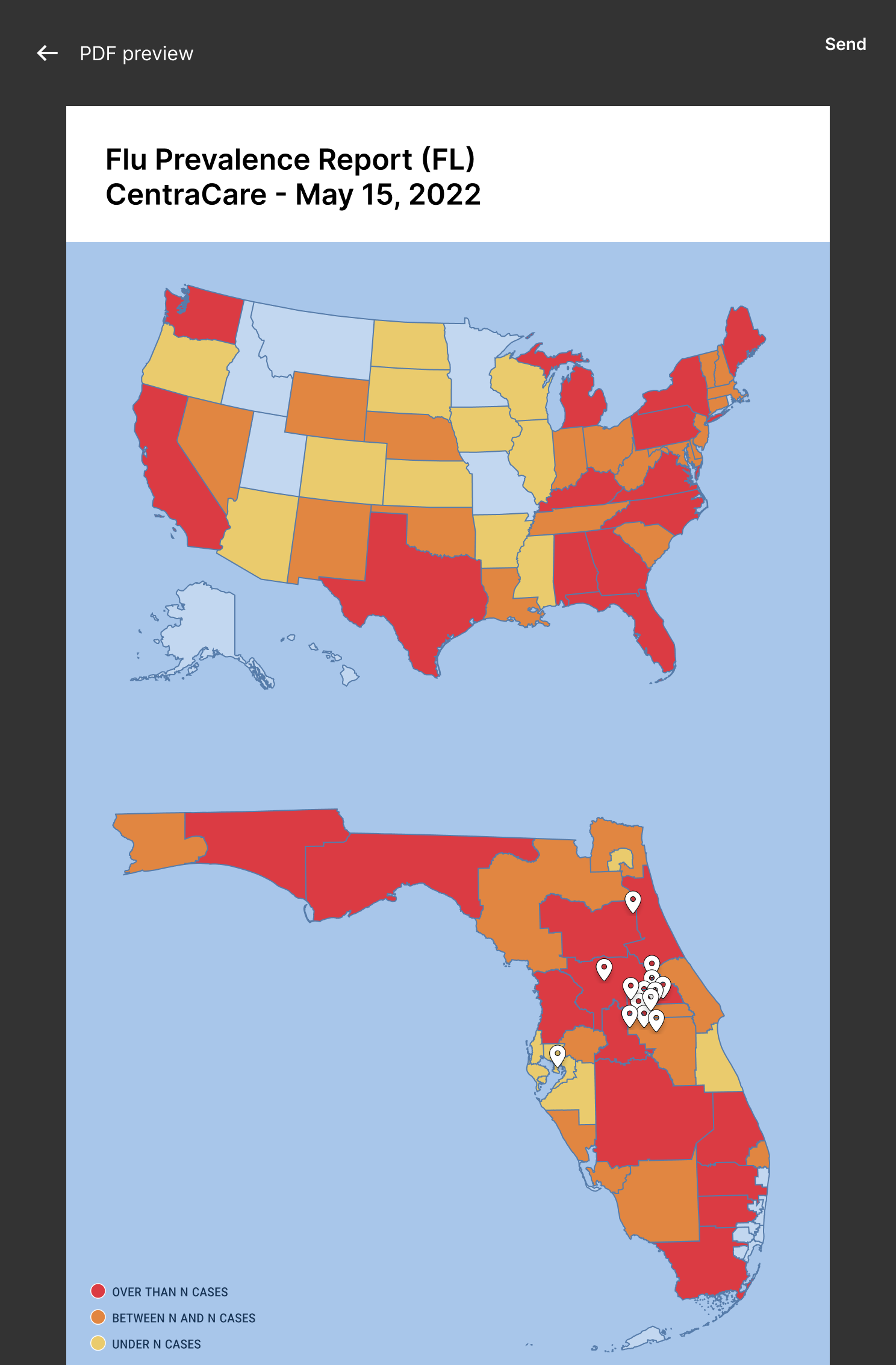
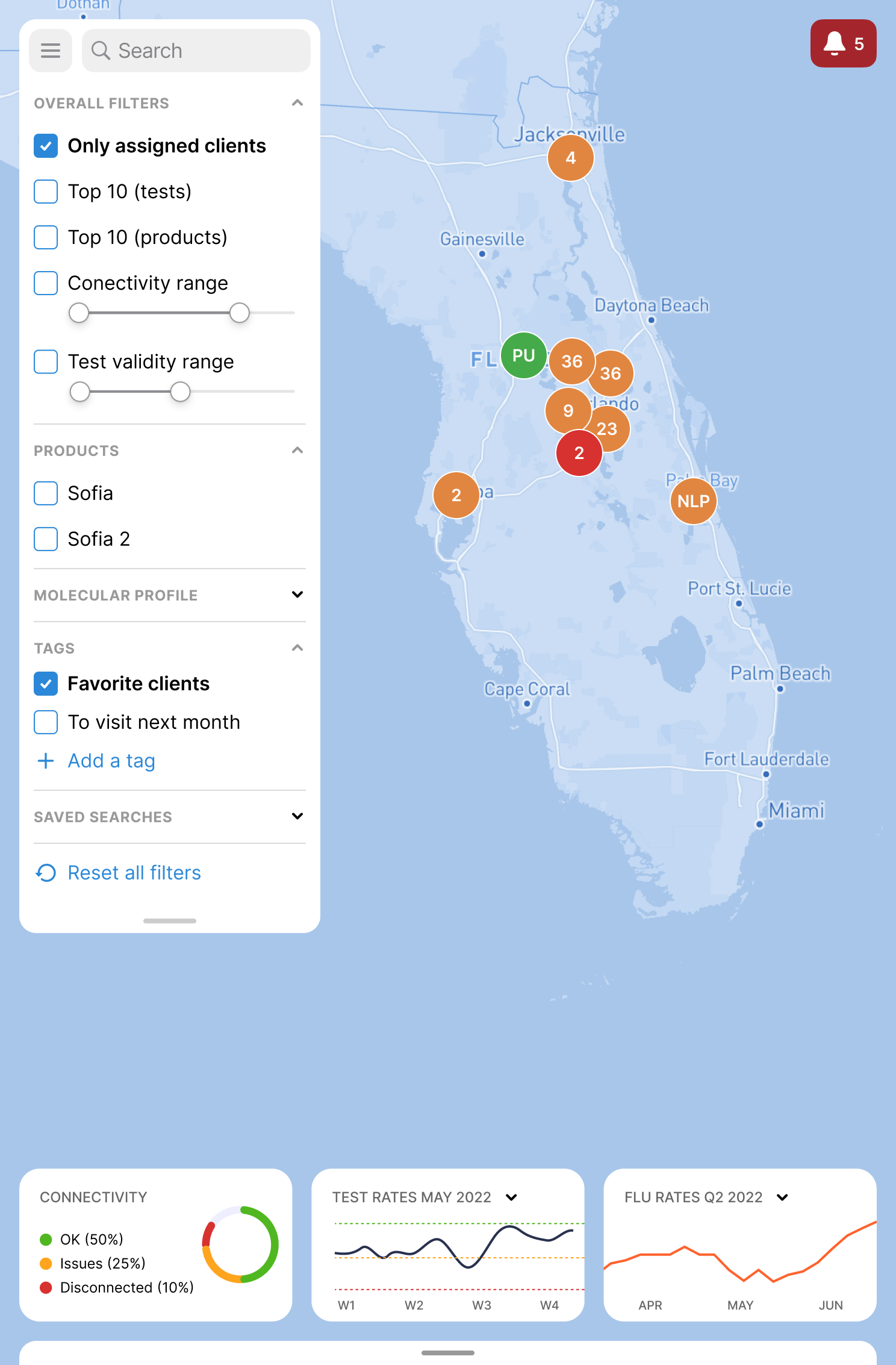
The new map view is the home screen. State-level color coding for flu prevalence. Cluster pins for client density. A time scrubber that lets TAMs play the last 12 months as an animation — watching outbreak patterns roll across the country and timing their outreach to the data.
When they tap a state, the view zooms in. Florida becomes Florida. The clusters become individual clinics. The data becomes actionable. The map isn't a feature. It's the navigation system.
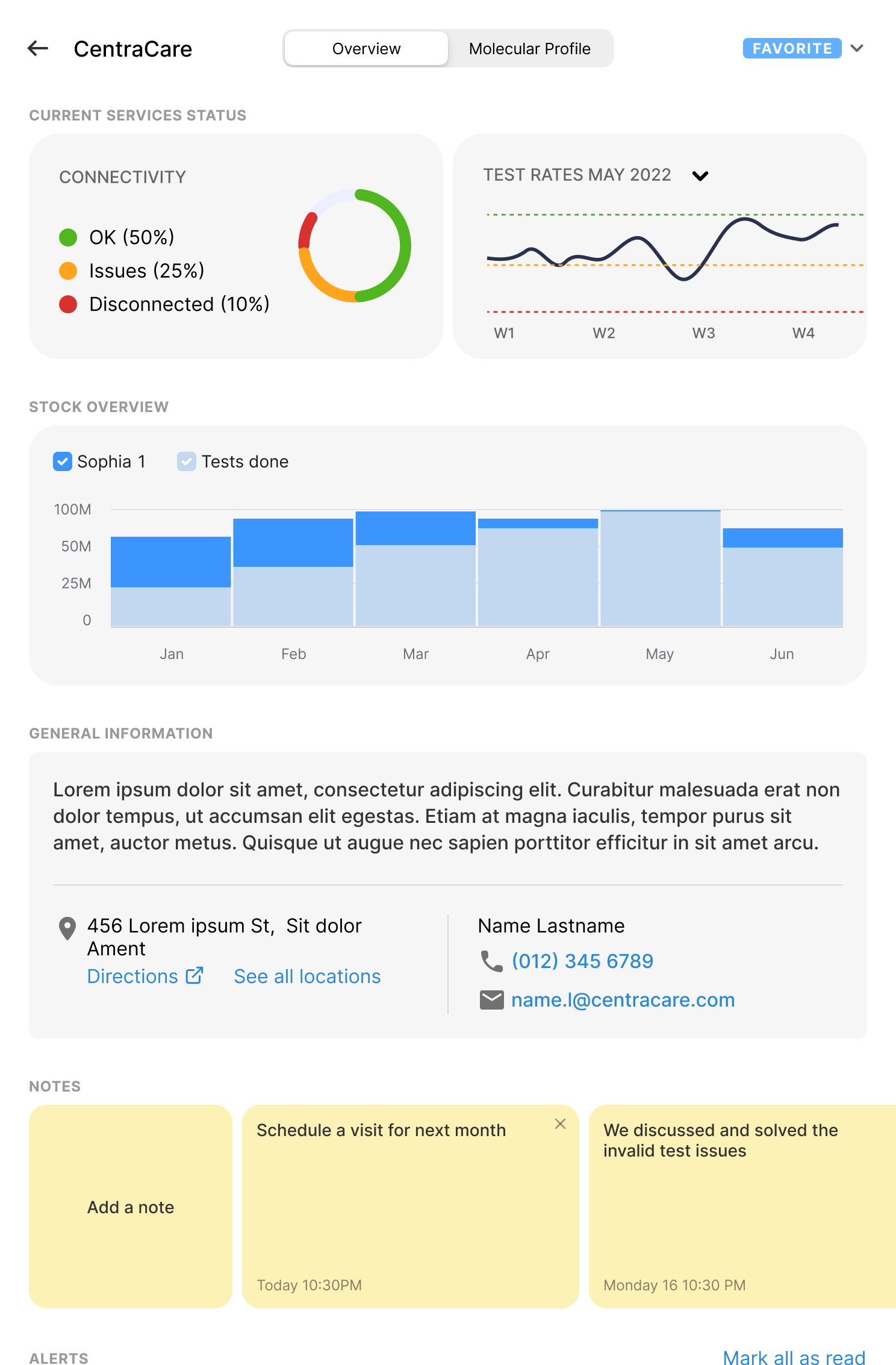
One of the most-cited frustrations: TAMs would call a customer with stale data because pulling fresh numbers required four tools. So I designed a single client view that pulls together what they actually use mid-call — connectivity status, test rates over time, stock overview, contact info, and notes from previous visits.
The Notes section is unglamorous but powerful. "Schedule a visit for next month." "We discussed and solved the invalid test issues." These are the breadcrumbs that turn a sales rep into a trusted partner. The old tools made TAMs keep these in their heads or in personal notebooks. The new design makes them part of the customer record.
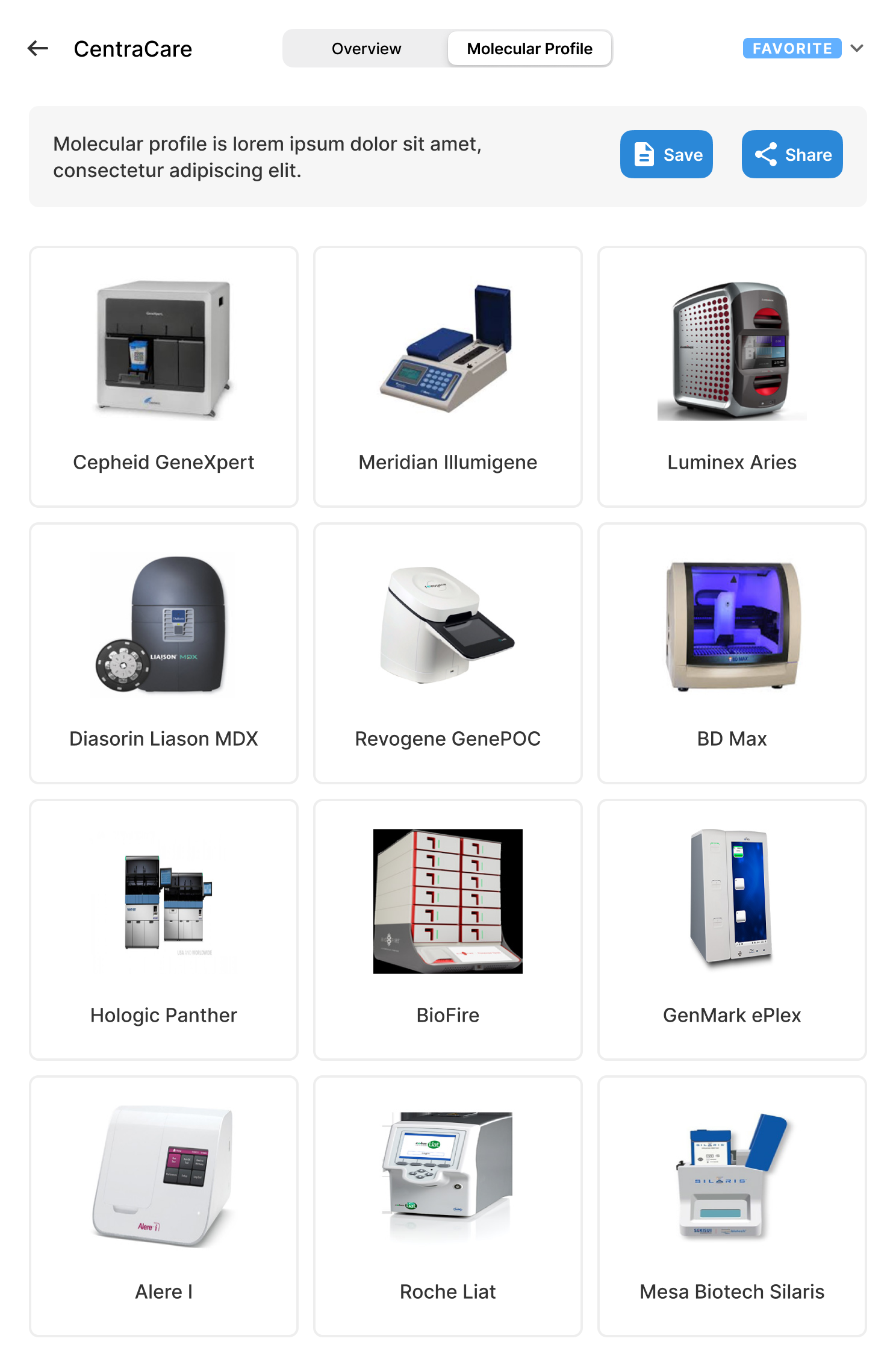
A separate Molecular Profile tab catalogs which diagnostic devices the client owns — Cepheid GeneXpert, Hologic Panther, BD Max, Roche Liat. TAMs can talk competitively without scrambling.
Six steps of synthesis — interviews, affinity, journey, persona — happened before a single pixel was placed. The screens are downstream of the thinking.
The biggest unlock was architectural, not visual. Moving from desktop-only to mobile-first eliminated the single biggest reason TAMs avoided the legacy tool.
For users who think in territories, the map isn't a visualization — it's the home screen. Zoom from country to state to client without leaving the spatial mental model.
Working in healthcare didn't just sharpen my dashboard chops. It changed how I think about every interface I touch.
When a missed alert can cascade into a missed diagnosis or a delayed repair, every visual decision is a safety decision. That mindset travels — even in lower-stakes products, it raises the floor.
FSEs and lab techs don't read interfaces — they scan them. That forced me to design for at-a-glance recognition, predictable patterns, and ruthless removal of anything that didn't earn its pixels.
In healthcare, every color carries meaning. Red is critical. Yellow is warning. Green is healthy. You don't get to use red for "primary CTA." That discipline made me a better systems thinker for every product since.
Healthcare clients don't accept "I think users will like this." Every design decision had to trace back to a user interview, an observation, or a documented constraint. That rigor became my default everywhere.
Multiple healthcare clients shipped, real users in the field, and a body of work that holds up to scrutiny from regulated stakeholders. The kind of design history that takes years to build.